 ExpenseHut · Help Docs
Products
You can create unlimited unlimited number of products under any subscription.
To Add Single Product.
- Login to the web app
- Select your organization.
- Select More options in top nav menu
- Select Products
- Click Add Product button
- Fill in the details.
- Name - Product name * required
- Description - [optional]
- Quantity - [optional] You can the set the count available in your inventory. They will be deducted if they are added to Orders. You will be notified when a product quantity get lesser than 5.
- Price- * required
- BarCode - [optional] Used when scanned via barcode scanners for Retail Checkout.
- SKU - [optional]
- Tax - [optional] - Applicable only to India merchants.
- Sales Tax Excluded - [optional] Enable this if the product is excluded from sales tax.
- Images - [optional] You can add images later if needed.
Products Restocking
You can enable restocking for each product by checking the Enable Restock checkbox.
- Vendor: The vendor for the product.
- Restock Threshold: This is the threshold at which stock requests will be generated once the product quantity in your inventory reaches this level.
- Restock Quantity:. This is the quantity that will add in the restock request sent to your vendor.
Add Bulk Products
You can import multiple products at once from excel spreadsheet.
Please be sure to save your excel spreadsheet in CSV format. Other formats are not supported.
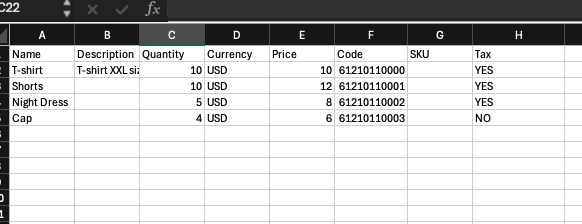
See columns and row format here for examples.
Follow the below steps- Login to the app
- Select your organization.
- Go to Apps options in top nav menu
- Select Products
- Click Add Multiple button in the top right corner of the products table.
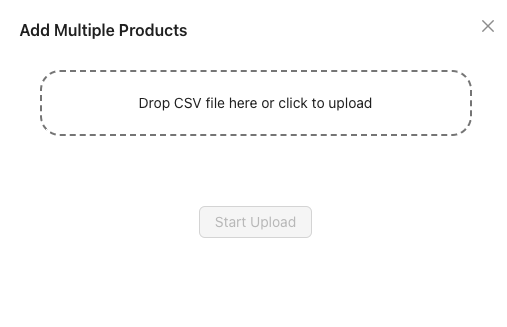
- In the upload dialog, [image below], upload the CSV file from your computer or drag drop into the section
- Click Start Upload
Multi-Product Upload - Spreadsheet Columns
To ensure multi-products works correctly, you must have the following columns.
There should be NO empty columns to the left or empty rows.
Please be sure to have the following columns.- Name: * required
Upto 100 characters max. Alphanumeric.
- Description:
Upto 250 characters max. Alphanumeric.
- Quantity:
Numeric values only. Can only be upto 2 decimals.
- Currency:
Acceptable values are AUD, USD, INR or GBP. If not specified, currency based on your organization country will be used.
- Price: * required
Numeric values only. Can only be upto 2 decimals.
- Code:
Optional barcode value.
- SKU:
Optional SKU value.
- Tax:
YES if sales tax is included. Otherwise, NO. If empty or if you do not include this column, then it will default to YES.
- Tax Percent:
Optional numeric tax rate for the product, e.g. 18. Leave empty or omit this column if the product has no specific tax rate.